EZanswer (Good bye! Slider)
Be free from default call screen!!It may not work on some phones.
You can cancel the order within 15 mins if it doesn't work.
(By Google policy)
Check comments of other 6,617 paid version users.http://www.androidpit.com/en/android/market/apps/app/com.kigate.EZanswer/EZanswer-Good-bye-Slider#
Support the following.- Answer (normal, speaker phone), silent ringer, reject a call- by screen touch (click, press and hold), volume button (up, down), camera button, upside down, shake.- Incoming call log and spam management.- Silent ringer and reject for spam.
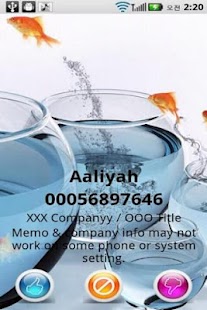
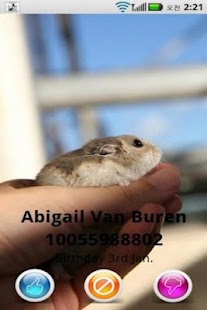
(call block)- Hang up notice by vibration.- Release patten lock to answer and relock.- Full screen Image (Caller ID)- Display additional info (caller info - Company, department, title, notes, memo)
* EZanswer includes all the following apps.1.
EZtouch : asnwer / reject a call by screen touch.2.
EZbutton : answer / reject a call by hardware button.
(button answer)3.
EZshake : answer / reject a call by shake and upside down.
(shake answer)4.
EZblock : call blocker.5.
EZnotice : Notice hang up by vibration.6.
Full screen Image (caller ID)7.
Display additional info (Company, department, title, notes)8.
Unknow number : Action for number not registed in the phone.9.
?
Can set individual image, default image.
Can Display default images randomly.Additional info may not work on some phones or system settings.
Please check it with trial version.Shake setting recognizes direction to avoid doing action by itself while your device is in your pocket.
Please face screen sideward like doing handshake or answering a call in real when you use it.
(not upward, downward, forward, backward)EZanswer doesn't change your incoming screen.
It displays 3 buttons to answer / be silent / reject a call on your default incoming call screen.(You can use your default incoming call screen as well at the same time.)This app use signal from default phone app, So please think it as an app helping answering a call.
* EZanswer has been tested with bluetooth headset, Motorola s305, and didn't disable the headset's buttons.
It works fine.
You can check your bluetooth headset with trial version.
I think you can use EZanswer and headset together by checking off button settings if you have a problem when you use headset.
* Answering by Apps works well on Froyo (and under Froyo) version but it's disallowed from Gingerbread version by Google policy.
So, EZanswer uses a kind of cheat to answer on Gingerbread as well but it doesn't work on some phones.You have to go back to default call screen by back button on your phone if you can't answer by Apps.
If solution comes up, I'll apply it for phones that can't answer.Other functions are fine on Gingerbread.You can check it with trial version.(Android version : Froyo = 2.2, Gingerbread = 2.3)
* Please resize the image first by other image apps or PC if FC is happened when you add an image.(Too big size of images may cause FC when you edit images.)
* You can call answer with full screen caller id* You can use fullsreen HD and big screen* It support useful, easy and convenient way to answer a call.
* Free version can use 2 days only, You need to get paid version to get full version.
About EZanswer (Good bye! Slider)
- Package name (App ID)
- com.kigate.EZanswerLicense
- Available on
- Google Play
- Price
- Free
- Version
- v1.5.2.3
- Developer
- JustBit Srl
Looking for the EZanswer (Good bye! Slider) APK?
The safest way to get EZanswer (Good bye! Slider) (com.kigate.EZanswerLicense) on your Android device is to install it directly from Google Play — you'll always get the latest official version, automatic updates, and no risk of modified or infected APK files from third-party sites.
Gaming Features
Enjoy immersive gaming experience with various game modes.
Camera Features
Advanced camera features with editing capabilities.
Food & Dining
Discover recipes and order food from your favorite restaurants.
See EZanswer (Good bye! Slider) in Action

Frequently Asked Questions
Is EZanswer (Good bye! Slider) free?
Yes, EZanswer (Good bye! Slider) is free to download and install on Android through Google Play.
How do I install EZanswer (Good bye! Slider) on Android?
Open Google Play on your Android phone or tablet, search for EZanswer (Good bye! Slider) by JustBit Srl or tap the Google Play button on this page, then tap Install. The app downloads and installs automatically.
What is com.kigate.EZanswerLicense?
com.kigate.EZanswerLicense is the App ID (package name) of EZanswer (Good bye! Slider) on Google Play. Every Android app has a unique package name, and it is the safest way to verify you are installing the official app.
Is EZanswer (Good bye! Slider) safe to download?
Installing EZanswer (Good bye! Slider) from Google Play is the safest option: you get the official version published by JustBit Srl, verified by Google Play Protect, with automatic updates. Avoid APK files from unofficial third-party sites.

Get EZanswer (Good bye! Slider) Today
EZanswer (Good bye! Slider) for Android — free download on Google Play.
Compatible with Android phones and tablets — available on Google Play.
Ask AI about this app
Get instant answers about features, tips and more from popular AI assistants.